

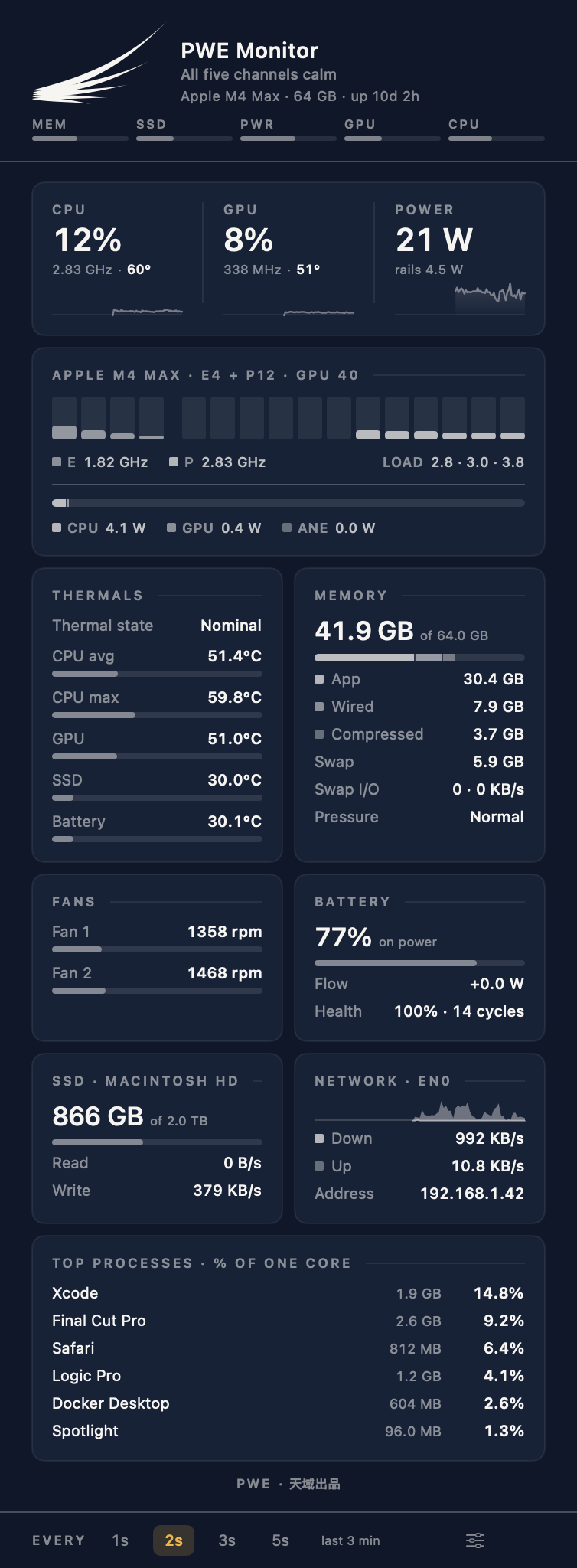
Recorded from the app on an M4 Max, every core pinned. The cores turn amber at once and the wing stays calm; it is heat, not load, that sends colour out along a feather.
在 M4 Max 上从 app 录制,所有核心跑满。核心柱立刻变琥珀色,翅膀依然平静 —— 让颜色沿羽毛往外走的是热量,不是负载。
Five feathers, five channels
五根羽,五个通道
Most monitors borrow the same traffic-light red and green. This one reports through its own mark. Each feather is one health channel, innermost first: memory, storage, power, GPU, CPU.
大多数监视器都在借用同一套红绿灯。这一个用自己的标识说话 —— 每根羽毛是一个健康通道,由内向外依次是:内存、存储、功耗、GPU、CPU。

Calm, warm, hot. When nothing is wrong the mark is drawn solid, exactly as the brand standard draws it. Working hard turns a feather amber; coral is kept for a verdict — macOS reporting thermal pressure, memory going critical, the SSD past its rating, a battery outside its range — and only that feather carries the halo. The hot state here is staged by the app's own renderer, not an illustration of it.
静 / 温 / 灼。一切正常时,标识就是标准里那个完整的标识。吃力的羽毛转琥珀;珊瑚只留给判定 —— macOS 报热压力、内存压力严重、SSD 超出额定温度、电池超出范围 —— 也只有那一根起辉光。图中的「灼」由 app 自己的渲染器摆出来,不是示意图。
Colour is spent sparingly and always means the same thing. A normal reading gets no colour at all — it renders in the ordinary ink, so anything coloured is worth a look. Amber says a channel is working hard. Coral is reserved for a verdict: macOS reporting thermal pressure, memory going critical, the SSD past its rating, a battery outside its range. A temperature or a wattage we grade ourselves never turns the panel red, however high it climbs — a monitor that cries wolf teaches you to stop looking at it.
颜色是稀缺资源,含义始终如一。正常读数完全不着色 —— 用普通墨色渲染, 所以任何有颜色的地方都值得看一眼。琥珀表示某一路正在吃力。珊瑚红只留给判定 —— macOS 报告热压力、内存告急、固态硬盘超出额定、电池超出工作范围。我们自己拿阈值去卡的温度和瓦数, 无论爬到多高都不会把面板变红:一个动辄报警的监视器,只会教会你别再看它。
The same restraint applies to what is on the panel at all. It reads what your Mac has, once, at launch: a Mac mini, Studio or iMac shows no battery, a MacBook Air shows no fans, and the cards that remain close up around the gap — no machine carries a card that says "none" for its whole life.
面板上放什么,也是同样的克制。启动时它读一次这台 Mac 实际有什么:Mac mini、 Studio、iMac 不显示电池,MacBook Air 不显示风扇,剩下的卡自动合拢 —— 没有哪台机器会一辈子挂着一张写着「无」的卡。
One file. Nothing else to install.
一个文件,没有别的要装。
Most Apple Silicon monitors are a front end over a command-line tool you have to install first, usually through Homebrew, and a helper process that keeps running. This one is a single app. The sensor code — IOReport, the SMC, the HID sensors — is compiled into it. Copy it to any Apple Silicon Mac and it runs.
大多数 Apple Silicon 监视器都是某个命令行工具的外壳 —— 你得先装那个工具(通常还要经过 Homebrew), 外加一个常驻的辅助进程。这个不是。传感器代码(IOReport、SMC、HID 传感器)直接编译在里面。拷到任何一台 Apple Silicon Mac 上就能跑。

Choose the wing on its own, or add power and temperature beside it. At the default two-second refresh it costs 1.5–1.8 % of one core, measured on an M4 Max, and the sensor sweep only runs while the panel is open.
可以只显示翅膀,也可以在旁边加上功耗与温度。默认每 2 秒刷新时,常驻占用为单核的 1.5–1.8 % (M4 Max 实测),完整的传感器扫描只在面板打开时才运行。
It says what it means, in two languages
它把结论说出来,两种语言
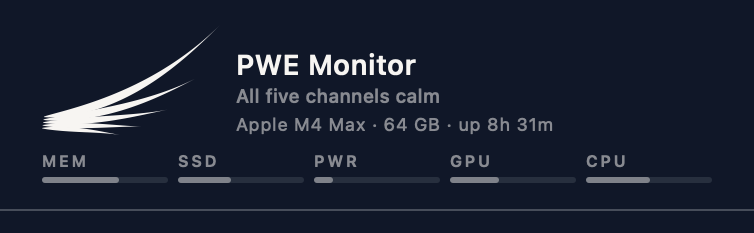
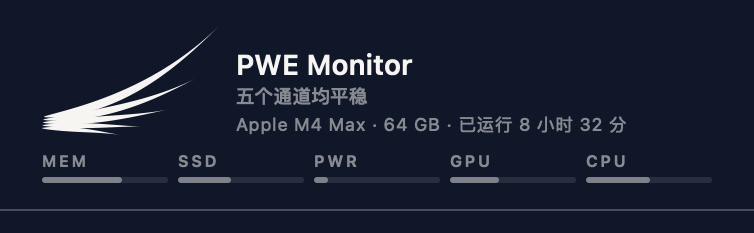
The mark states all five channels exactly, and says nothing. Under the wordmark is the sentence that goes with it — All five channels calm, or Memory pressure warning · 6m, or Power warm · 185 W — which is also what VoiceOver reads when it reaches the mark. It is the only line in the panel that carries colour while everything else is quiet.
羽翼把五个通道精确地表达出来,但它不说话。品牌字下面那一行就是它对应的话 —— 「五个通道均平稳」,或者「内存压力警告 · 6m」、「功耗偏高 · 185 W」。VoiceOver 读到这个标记时念的也是这句。它是整个面板里唯一在其他一切都安静时仍带颜色的一行。
What it will not pretend to do
它不会假装能做的事
Apple Silicon only, and that will not change
只支持 Apple Silicon,而且不会改变
The per-core residency and energy-model counters this reads do not exist on Intel Macs.
它读取的逐核心驻留与能耗模型计数器,在 Intel Mac 上不存在。
It reads; it does not write
只读,不写
No fan control, no voltage or frequency changes, nothing that touches your hardware's settings.
不控制风扇、不改电压频率、不碰任何硬件设置。
Sensors differ by model
不同机型的传感器不同
Where a Mac does not expose a sensor, the reading is hidden rather than guessed.
机器不提供的读数会被隐藏,而不是猜一个出来。
Your data
你的数据
Nothing leaves your Mac unless you ask. There is no telemetry and no crash reporting. The one request it can make is the update check: off until you turn it on, or one check when you choose "Check for Updates…". It sends the app's version and the macOS version, nothing else.
除非你要求,没有任何数据离开你的 Mac。没有统计、没有崩溃上报。它唯一可能发出的请求是检查更新:默认关闭,或者你点「检查更新…」时查一次。只发送 app 版本和 macOS 版本,别的都不发。
On Windows
Windows 版
PWE PC MONITOR
PWE PC MONITOR
The Windows companion. Same wing, same palette, same calm / warm / hot language and the same compact dashboard — reading Windows-native telemetry instead, through LibreHardwareMonitor. Notification-area icon, an optional always-on-top widget, per-core bars, GPU temperature from the NVIDIA, AMD or Intel driver, and read-only fan RPM.
Windows 上的同门。同一只翅膀、同一套配色、同样的静 / 温 / 灼语言、同样紧凑的面板 —— 只是改读 Windows 原生遥测,经由 LibreHardwareMonitor。通知区图标、可选的置顶浮窗、逐核心柱状图、从 NVIDIA / AMD / Intel 驱动取得的 GPU 温度,以及只读的风扇转速。
Free, and the source is public
免费,而且源码公开
No licence, no trial, no account, no analytics. The source is on GitHub under the MIT licence — with one carve-out: the wing mark, the PWE and Paradise Production names and the application icon are ours and are not covered by it. Fork the code, not the identity.
没有授权码、没有试用期、没有账号、没有统计。源码在 GitHub 上以 MIT 协议开放 —— 只有一处例外:翅膀标识、PWE 与 Paradise Production 名称、以及应用图标属于我们,不在协议范围内。可以 fork 代码,不要 fork 身份。
What it reads
它读什么
Per-core, not per-chip
按核心,不是按芯片
- Every physical core as its own bar, frequency-weighted
- Efficiency and performance clusters told apart
- Hottest core graded separately from the average — it is the hot one that throttles
- 每个物理核心一条独立的柱,按频率加权
- 能效核与性能核分开显示
- 最热核心与平均值分别判级 —— 降频看的是最热那个
The power budget, in full
完整的功耗构成
- CPU, GPU and Neural Engine rails separately — plus DRAM where macOS still reports it live
- System wattage against your chip's own envelope
- A rail turns amber only when it is working hard — never just for being the biggest
- CPU、GPU、神经引擎分路计量;macOS 仍实时提供时,另加 DRAM
- 整机功耗对照本芯片自己的功耗包络
- 某一路真在吃力才变琥珀,不会只因为它最大就着色
Temperatures that are real
真实的温度
- CPU average and hottest core, GPU die, SSD, battery
- Power-gated sensors reporting near-zero are discarded, not averaged in
- A sensor with no reading shows an em dash, never a fabricated 0.0 °C
- CPU 平均与最热核心、GPU 芯片、SSD、电池
- 断电传感器返回的近零垃圾值会被剔除,不参与平均
- 读不到就显示破折号,绝不编造一个 0.0 °C
And the rest of the machine
机器的其余部分
- Memory by segment, with macOS's own pressure level and how long it has held — not just "used"
- Fan RPM, read-only. There is no fan-control path
- SSD capacity and throughput, network traffic over time, top processes
- 内存按段划分,并显示 macOS 自己给出的压力级别和它持续了多久 —— 不只是「已用」
- 风扇转速,只读。没有任何风扇控制通道
- SSD 容量与读写、网络流量曲线、占用最高的进程
Specs
规格
| Mac | Any Apple Silicon Mac. Not Intel: the counters it reads do not exist there. |
|---|---|
| macOS | macOS 14 or later. |
| Size | 1.0 MB. A single app with the sensor code compiled in: no Homebrew, no helper process, no runtime to install. |
| Languages | English and 简体中文. The interface follows your Mac; a Language setting overrides it. |
| Install | Signed and notarised by Apple, so it opens with no security warning. Prefer Homebrew? brew install --cask kenshinice-ai/tap/pwe-mac-monitor |
| Overhead | 1.5–1.8 % of one core at the default two-second refresh, measured on an M4 Max. |
| Network | None, except the update check: off until you turn it on, or one check when you choose "Check for Updates…". |
| Price | Free. MIT licence, except the wing mark, the names and the icon; the source is on GitHub. |
| Windows | PWE PC MONITOR: Windows 10 (2004) or later, x64, free. |
| Mac | 任何一台 Apple Silicon Mac。不支持 Intel:它读取的计数器在 Intel Mac 上不存在。 |
|---|---|
| macOS | macOS 14 或更新版本。 |
| 大小 | 1.0 MB。一个应用,传感器代码直接编译在里面:不用 Homebrew,没有常驻的辅助进程,没有运行时要装。 |
| 语言 | 简体中文与 English。界面默认跟随系统,设置里的「语言」可以覆盖。 |
| 安装 | 已由 Apple 签名公证,打开不会有安全提示。习惯用 Homebrew?brew install --cask kenshinice-ai/tap/pwe-mac-monitor |
| 占用 | 默认每 2 秒刷新时,常驻占用为单核的 1.5–1.8 %(M4 Max 实测)。 |
| 联网 | 不联网。唯一的例外是检查更新:默认关闭,或者你点「检查更新…」时查一次。 |
| 价格 | 免费。MIT 协议,翅膀标识、名称和应用图标除外;源码在 GitHub 上。 |
| Windows | PWE PC MONITOR:Windows 10 (2004) 或更新版本,x64,免费。 |
Latest
最近更新
1.7.6 · 2026-10-16
A hot CPU or GPU now says its temperature in the line under the name, instead of a percentage. The process card's title no longer shows a blue focus ring when the panel opens.
CPU 或 GPU 过热时,名字下面那一行现在直接说温度,不再报百分比。打开面板时,进程卡片的标题不再出现蓝色焦点框。