
A payslip in, an annual income out
放进一张工资单,得出一个年收入
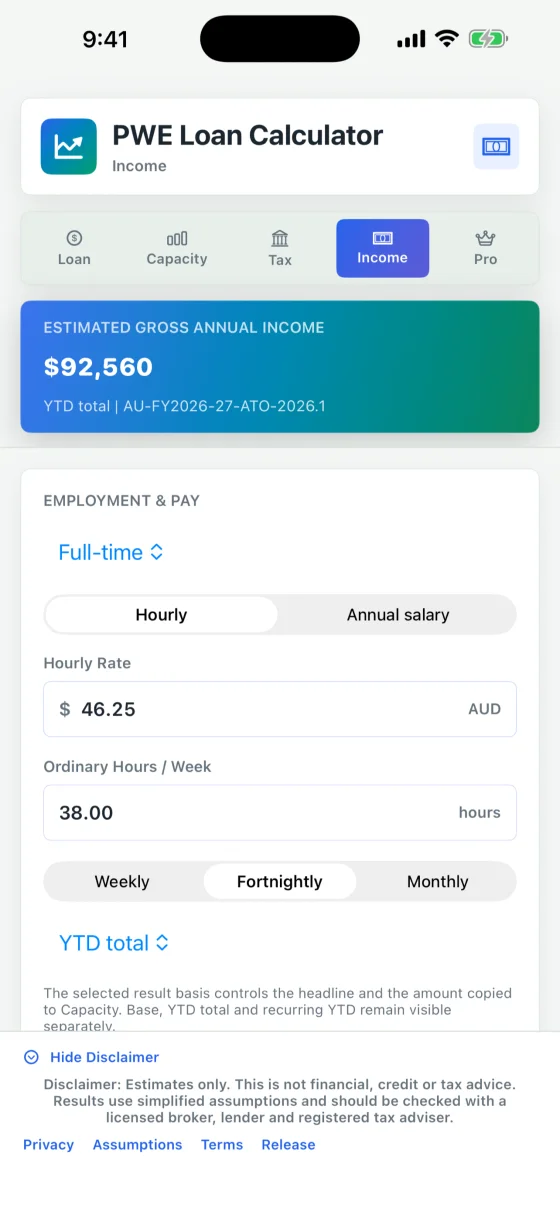
Hourly or salary, annualised from year-to-date figures, with overtime, allowances, bonus and commission kept apart so nothing is counted twice. PAYG withholding, the Medicare levy, study loan repayments and employer super at the statutory 12% are worked out alongside. All of that is free.
时薪或年薪,按 YTD 数字年化;加班、津贴、奖金与佣金分开列示,避免重复计算。PAYG 预扣、Medicare 税、学生贷款还款,以及按法定 12% 计的雇主养老金,一并算出。这些全部免费。
With Pro Annual, the assistant reads the payslip for you, from the camera, a photo, a PDF or a file. You check every figure before it goes in, and each one says where it came from.
订了 Pro Annual,助手会替你读工资单:用相机拍,或从照片、PDF、文件里读。每个数字填进去之前都由你核对,而且每个都注明出处。
Five calculators, all free
五个计算器,全部免费
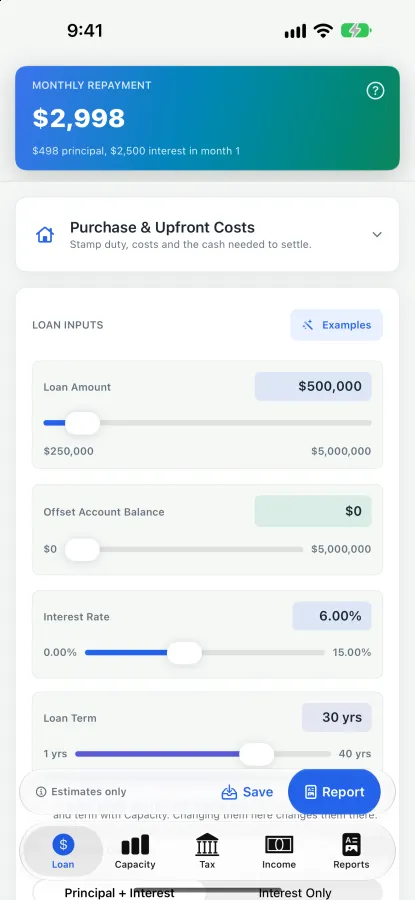
- Loan repayments: principal and interest or interest-only, an offset balance, full amortisation.
- Borrowing capacity: single or couple, dependants, existing commitments, rental income.
- Property tax position: negative gearing, depreciation, the tax benefit and after-tax cash flow.
- Employment income: hourly or salaried pay annualised, with PAYG, Medicare, study loan repayments and employer super.
- Purchase costs: stamp duty for each state and territory by its revenue office's published rules, first-home concessions, the foreign purchaser surcharge, funds to complete, the loan needed and the LVR.
- 还款:本息同还或只还利息,对冲账户余额,完整的摊还表。
- 借贷能力:单人或夫妻,供养人数,现有负债,租金收入。
- 房产税务:负扣税、折旧、税务抵扣额与税后现金流。
- 工资收入:时薪或年薪年化,含 PAYG、Medicare、学生贷款还款与雇主养老金。
- 购房费用:各州和领地的印花税,按各自税务局公布的规则计算;首置优惠、海外买家附加税、交割所需资金、所需贷款额与 LVR。
One loan, three views: amount, offset, rate and term are shared by the Loan, Tax and Capacity tabs. Type an exact figure into any slider, or drag it. Australian tax scales, the Medicare levy, study loan thresholds, the super guarantee and negative-gearing treatment are all stated in the app.
一笔贷款,三个角度:金额、对冲、利率和年限由还款、税务、借贷能力三个页签共用。每个滑块都可以直接输入精确数字,也可以拖动。澳洲税率表、Medicare 税、学生贷款门槛、法定养老金和负扣税的处理方式,都在 app 里写明。
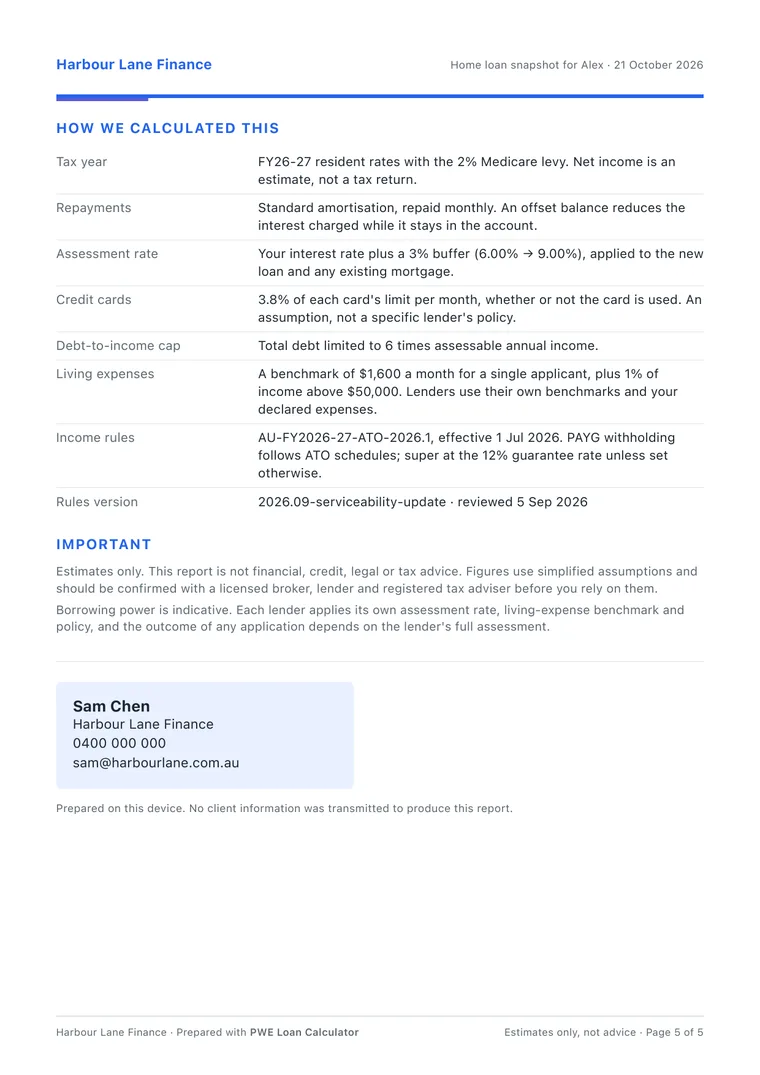
How borrowing power is assessed
借贷能力是怎么评估的
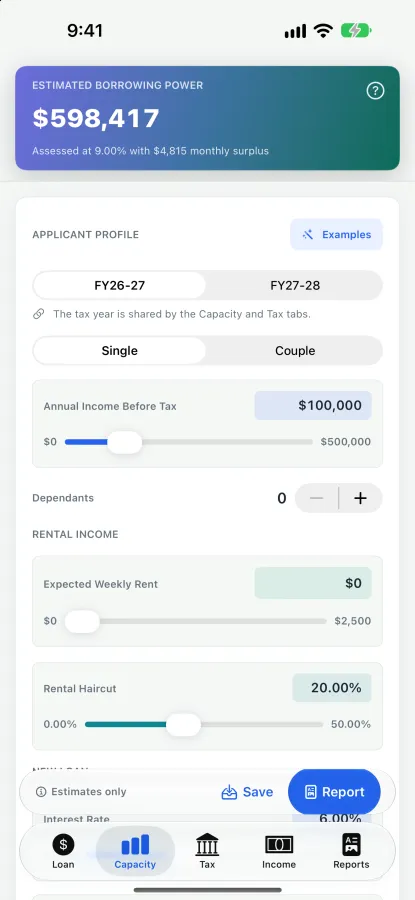
- Rate: the rate you enter plus a 3% buffer — 6.00% is assessed at 9.00% — for the new loan and any existing home loans. There is no minimum floor rate.
- Living expenses: the app's own benchmark, not HEM — $1,600 a month for a single, $2,800 for a couple, $400 for each dependant, plus 1% a year of income above $50,000. Declared expenses are not used.
- Commitments: other loans at the repayment you enter; existing home loans at their own rate plus 3%, over the new loan's term, up to 30 years; credit cards at 3.8% of the limit each month, used or not. Rental income counts at 80% by default; you can change the haircut.
- A DTI cap: total debt at most six times assessable income, less existing balances and card limits. The answer is the lower of what the monthly surplus can repay and that cap.
- 利率:你填的利率加 3% 缓冲(6.00% 按 9.00% 评估),新贷款和现有房贷都这样算;没有最低评估利率。
- 生活支出:用 app 自己的基准,不是 HEM:单人每月 $1,600,夫妻 $2,800,每个供养人加 $400;收入超过 $50,000 的部分,每年再加 1%。不使用申报的支出。
- 负债:其他贷款按填的月供计入;现有房贷按它自己的利率加 3%、按新贷款的期限摊还,最长 30 年;信用卡每月按额度的 3.8% 计,用不用都算。租金收入默认计入 80%,折扣比例可以自己调。
- DTI 上限:总负债不超过可评估收入的 6 倍,并扣除现有负债余额和卡额度。结果取「月结余能还得起的额度」和这个上限中较低的那个。
It is a simplified model. Borrowing power is indicative: each lender applies its own assessment rate, living-expense benchmark and policy.
这是简化模型。借贷能力只是参考:每家贷款机构都有自己的评估利率、生活支出基准和政策。
Pro Annual
An assistant that writes words, never figures
助手只写文字,从不写数字
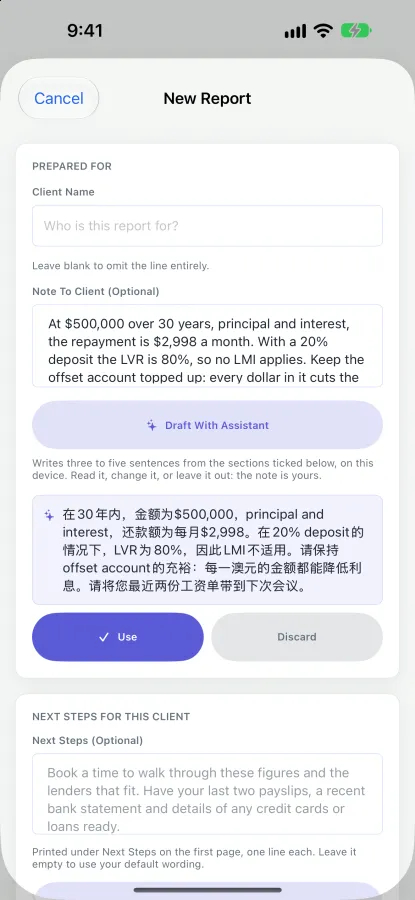
The assistant runs on the device too. It drafts the note to your client from the figures the report will print, the next steps for this client, and the message that goes with the report. It also writes a Chinese version of your note, with lending terms such as LVR and offset account kept in English and explained underneath.
助手同样在设备上运行。它根据报告里会印出的数字,替你起草给客户的说明、这位客户的下一步,以及随报告一起发出的那段话;还能把你的说明写成中文版:LVR、offset account 这类贷款术语保留英文,下面用白话解释。
Every number comes from the calculators. Nothing is uploaded, and your client's name never goes to the model. You read each draft, then use it, change it or leave it out. It needs an iPhone or iPad that supports Apple Intelligence, with it turned on.
每个数字都来自计算器。不上传任何内容,客户的名字也不会交给模型。每份草稿你都先读,再决定采用、修改还是不用。需要支持 Apple Intelligence 的 iPhone 或 iPad,并且已经打开它。
Pro Annual
A report your client can read, in your brand
客户看得懂的报告,印着你的品牌
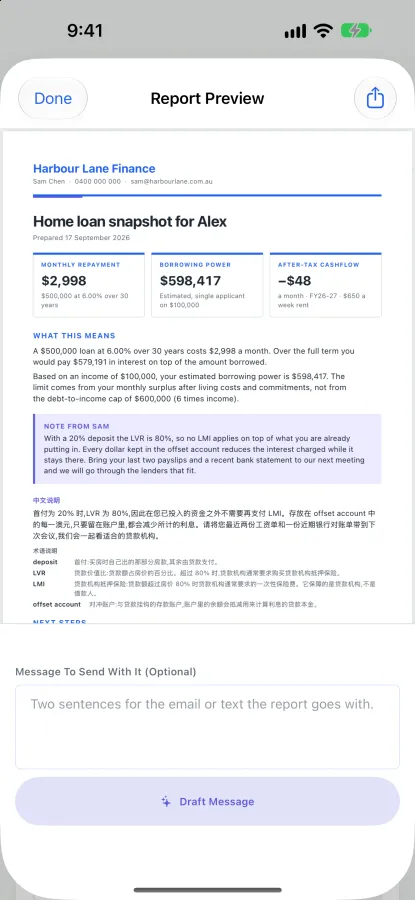
A first page your client can read on its own, a page per calculator with charts, and a closing page that shows how every figure was worked out. You choose what it covers. Preview one free with your own client's figures; sharing it needs Pro Annual.
第一页客户自己就能读懂;每个计算器一页,配图表;最后一页写明每个数字是怎么算出来的。报告包含哪些内容由你选。用你自己客户的真实数字免费预览,分享出去需要 Pro Annual。
Every page carries your name, company, phone, email and logo, in one of six colours the app follows. Reports and client scenarios are kept in the app, to reopen, reload or share again.
每一页都印着你的名字、公司、电话、邮箱和标志,配色从六种里选一种,整个 app 跟着变。报告和客户情景都保存在 app 里,可以重新打开、重新载入、再次分享。
Free, with an optional Pro
免费,Pro 可选
All five calculators are free, with no trial clock and no feature that stops working. Pro Annual is for the parts that turn a calculation into client work.
五个计算器全部免费,没有试用倒计时,也没有到期停用的功能。Pro Annual 面向的是把一次计算变成给客户的工作的那部分。
Everything you need to run the numbers.
把数算清楚需要的一切。
- Repayments with offset
- 带对冲账户的还款
- Borrowing power
- 借贷能力
- Negative gearing and holding cost
- 负扣税与持有成本
- Income annualisation, PAYG, Medicare and super
- 收入年化、PAYG、Medicare 与雇主养老金
- Purchase costs and stamp duty
- 购房费用与印花税
Per year. 14 days free for eligible new subscribers.
每年。符合条件的新订阅者先免费试用 14 天。
- The on-device assistant
- 设备上的助手
- Client reports to share
- 可以分享的客户报告
- Your brand on every page
- 每一页都是你的品牌
- Saved reports and client scenarios
- 保存报告与客户情景
- FY27-28 rules and scenario modelling (free uses FY26-27)
- FY27-28 规则与情景建模(免费版用 FY26-27)
- Ownership split across two owners
- 两人产权分割
- A second rate, side by side
- 第二个利率,并排对比
- A simple multi-property portfolio
- 简单的多物业组合
Pro Annual is an auto-renewing subscription, billed through your Apple Account. It renews unless cancelled at least 24 hours before the period ends; Apple shows the current price and any offer before you buy. Manage or cancel it in your Apple Account settings.
Pro Annual 为自动续订订阅,通过你的 Apple 账户扣费。除非在当期结束前至少 24 小时取消,否则会自动续订;购买前 Apple 会显示当前价格与任何优惠。可在 Apple 账户设置中管理或取消。
What it will not pretend to do
它不会假装能做的事
Estimates, not advice
只是估算,不是建议
It is not financial, credit, tax or legal advice. It does not assess or approve credit, make a lending decision, or submit an application. Rates, lender policy, tax rules and government policy change: check any figure that matters with a licensed broker, the lender, an accountant or a registered tax agent before acting on it.
它不构成财务、信贷、税务或法律建议;不评估、不批准信贷,不做贷款决定,也不提交申请。利率、贷款机构政策、税务规则与政府政策都会变化:任何重要的数字,在据此行动之前,请与持牌经纪人、贷款机构、会计师或注册税务代理核对。
The assistant does not calculate
助手不做计算
It drafts wording only. It never works out a figure, recommends a lender, product or rate, or judges whether a loan would be approved.
它只起草文字。它从不计算数字,不推荐贷款机构、产品或利率,也不判断一笔贷款能否获批。
No Apple Intelligence, no assistant
没有 Apple Intelligence,就没有助手
On an iPhone or iPad that does not support Apple Intelligence, or with it turned off, the assistant is hidden rather than greyed out. The Reports tab says why, and everything else works without it.
在不支持 Apple Intelligence 的 iPhone 或 iPad 上,或者没有打开它时,助手直接隐藏,而不是灰掉。「报告」页签会写明原因,其余功能照常可用。
Australia only
只服务澳大利亚
Its tax scales, duty rules and super guarantee are Australia's, and it is on the Australian App Store only.
它用的税率表、印花税规则和法定养老金都是澳洲的,也只在澳大利亚的 App Store 上架。
Your data
你的数据
Every calculation runs on the device, the assistant included. There is no account, no sign-in and no sync, and nothing is uploaded. The app carries no advertising, analytics, tracking or crash-reporting SDK.
所有计算都在设备上完成,助手也一样。没有账号,不用登录,不同步,不上传任何内容。应用里没有广告、统计、追踪或崩溃上报 SDK。
It asks for one permission, and only if you use it: the camera, to photograph a payslip. The photo is read on the device and not kept. Photos and Files open Apple's own pickers, which hand over only what you choose.
它只会要一个权限,而且只在你用到时才要:相机,用来拍工资单。照片在设备上读取,读完不保留。从「照片」和「文件」选取时,用的是 Apple 自己的选择器,只交出你选中的那一项。
Your brand, client names, payslip readings, reports and saved scenarios stay on the device. A report leaves the app only when you pick a destination in the share sheet.
你的品牌信息、客户姓名、工资单读数、报告和保存的情景都留在设备上。报告只有在你从系统分享面板选定去处之后,才会离开 app。
Specs
规格
| Devices | iPhone and iPad, iOS 26.0 or later. The iPad has a layout of its own. iPhone Duo: each calculator splits at the fold. |
|---|---|
| Version | 2.3, on the App Store since 2026-10-21: a new icon, and the Home Screen name Loan Calc. |
| Calculators | Five, all free: loan repayments, borrowing capacity, property tax position, employment income, purchase costs. |
| Rules | Stamp duty and first-home concessions for every state and territory, from each revenue office's published rules, as at 13 September 2026. Income: ATO withholding schedules for FY2026-27 (effective 1 July 2026), super at the 12% guarantee rate. Tax: resident rates with the 2% Medicare levy; calculation rules reviewed 5 September 2026. You choose FY26-27 or FY27-28 (Pro); FY27-28's negative-gearing treatment is a scenario, not current law. |
| Assistant | Part of Pro Annual. Needs an iPhone or iPad that supports Apple Intelligence, with it turned on. Runs on the device. |
| Permissions | Camera, optional: only to photograph a payslip. |
| Network | Nothing uploaded. No account, no sync, no analytics. |
| Price | Free. Pro Annual A$49.99 a year in Australia, 14 days free for eligible new subscribers, billed by Apple. |
| Where | The Australian App Store. |
| 设备 | iPhone 与 iPad,iOS 26.0 或更新。iPad 有自己的排版。iPhone Duo:展开后每个计算器沿折痕分成两栏。 |
|---|---|
| 版本 | 2.3,2026-10-21 起在 App Store 上:换了新图标,主屏幕上的名字改成 Loan Calc。 |
| 计算器 | 五个,全部免费:还款、借贷能力、房产税务、工资收入、购房费用。 |
| 规则 | 各州和领地的印花税与首置优惠,按各州税务局公布的规则,截至 2026 年 9 月 13 日。收入:按 ATO 2026-27 财年预扣税表(2026 年 7 月 1 日起生效),养老金按 12% 法定比例。税:居民税率加 2% Medicare levy;计算规则复核于 2026 年 9 月 5 日。税务年度由你选 FY26-27 或 FY27-28(Pro);FY27-28 的负扣税处理是情景模拟,不是现行法律。 |
| 助手 | 属于 Pro Annual。需要支持 Apple Intelligence 的 iPhone 或 iPad,并且已经打开它。在设备上运行。 |
| 权限 | 相机,可选:只用来拍工资单。 |
| 联网 | 不上传任何内容。无账号、不同步、不收集统计。 |
| 价格 | 免费。Pro Annual 在澳大利亚每年 A$49.99,符合条件的新订阅者免费试用 14 天,由 Apple 扣费。 |
| 上架地区 | 澳大利亚 App Store。 |